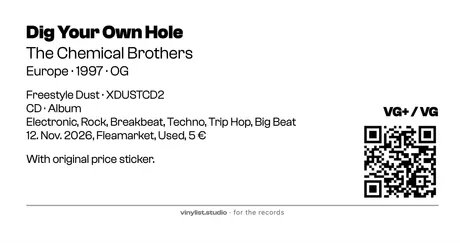
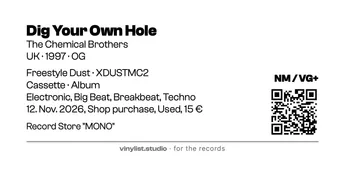
Labels, just the way you want them.
Vinylist comes with templates, but you are still free to design: frames, lines, fonts, spacing, content and order are all up to you.
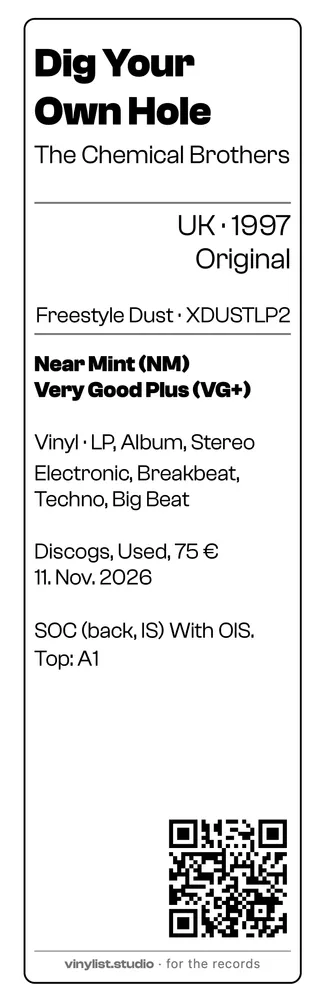
A real label shows what is possible. This template measures 61 × 192 mm and fits, for example, on the back of an LP’s protective sleeve.
With HERMA label sheets you can print four different labels at once, and up to 100 sheets in one batch. Your label designs sync automatically across all your devices, so you can, for example, design a label on the Mac and print the sheets from your iPhone whenever new records join your collection.
-
Frame & lines
Frame on or off – solid, dashed or dotted, single or double, square or rounded. Dividers can go anywhere you like.
-
Font & size
More than 30 fonts to choose from, plus size, weight, tracking and capitals – for each line on its own. Here the title and the condition are bold.
-
Margins
How far the frame and the text sit from the edge of the label is set separately for top/bottom and left/right.
-
Alignment
Left, centred or right – for each line on its own. Country, year and pressing sit on the right here.
-
Fields side by side
Several fields can share one line: country · year, label · catalogue number. The separator is a dot, comma, bar, slash or a plain space.
-
Spacing
How much air sits above each line is adjustable too – so what belongs together moves closer and blocks move apart.
-
Selection & order
Which fields go on the label, and in which order, is entirely up to you – on iPhone, iPad and Mac.
-
Your own fields from Discogs
Fields you created in your Discogs collection show up automatically and can go anywhere on the label. Here, for example, my custom fields from Discogs: Origin (where did I get the record?), Initial Condition (first owner or used) and Purchase Price (so the bargain keeps making me happy).
-
Free elements
Extra room to design: text, a line or a shape – placed freely on the label, moved, scaled and rotated.
-
QR code
Leads straight to this exact pressing on Discogs. On or off, left or right, 8 to 80 mm in size.
Same record, other media
The same album as a CD and as a cassette, each with its own template on the label sheet that suits the medium. All three to the same scale.